
AI Agents in Practice: From One Model Call to a Production System
Part 6
〇六Streaming and Time to First Token
The first word appears at 0.64 seconds; the tools finish at 2.79 or 3.20 seconds, depending on when the runtime starts them
For the same model call, the wait a user sees can differ a lot. Without streaming, the screen stays blank for 1.7 seconds and then the whole answer appears at once; with streaming, the first word appears at 0.64 seconds and the text is written out from there. In both cases the model needs 1.7 seconds to produce the complete response.
Streaming changes "when the first part of the result can be seen", not "when all of it arrives". For a chat application that only answers questions, that is enough. For an Agent that calls tools there is a second question: tool-call arguments also arrive piece by piece, so what is the earliest moment the runtime can start running a tool?
Two latency metrics
Time to first token (TTFT) is the time from sending the request to receiving the first output token. It includes the network, queueing and prefill parts taken apart in Article 02, and excludes decode.
Total latency is the time from sending the request to receiving the last token: TTFT plus all decode time.
The relationship can be written as:
T_total ≈ TTFT + N_output / decode_tpsN_output is the number of output tokens and decode_tps the tokens generated per second. TTFT is driven mainly by input length, the second term mainly by output length. So Article 02's "longer context, slower calls" shows up under streaming first as a longer TTFT: the request in round 50 waits for prefill to process 100,000 input tokens before the first word appears.
Without streaming the user's perceived wait is the total latency; with streaming it is TTFT. That is why mainstream chat products stream by default: it does not make the model faster, but the wait gets feedback sooner.
A streamed response is a sequence of events
With streaming on, the server no longer returns one complete JSON document; it pushes a series of events over SSE (Server-Sent Events, a protocol in which the server keeps pushing text events over one HTTP connection). Anthropic's streaming documentation defines the event order:
message_start: the response begins, with the message id and initial usage;- for each content block:
content_block_start, some number ofcontent_block_delta, thencontent_block_stop; message_delta: carriesstop_reasonand the final output token count;message_stop: the response ends.
content_block_delta comes in two main kinds. A text block's deltas are text_delta, each a short piece of text that can be displayed directly. A tool-call block's deltas are input_json_delta, each a piece of the arguments' JSON string, in a field named partial_json.
The key point: a single partial_json piece is not valid JSON. An argument {"limit": 5, "min_ms": 500} may arrive as {"li, mit", : 5, and so on, and can only be parsed safely once all pieces are joined, after content_block_stop.
OpenAI Chat Completions streams differently: tool arguments arrive as string pieces in delta.tool_calls[i].function.arguments, with index telling the tool calls apart, but they too must be joined before parsing.
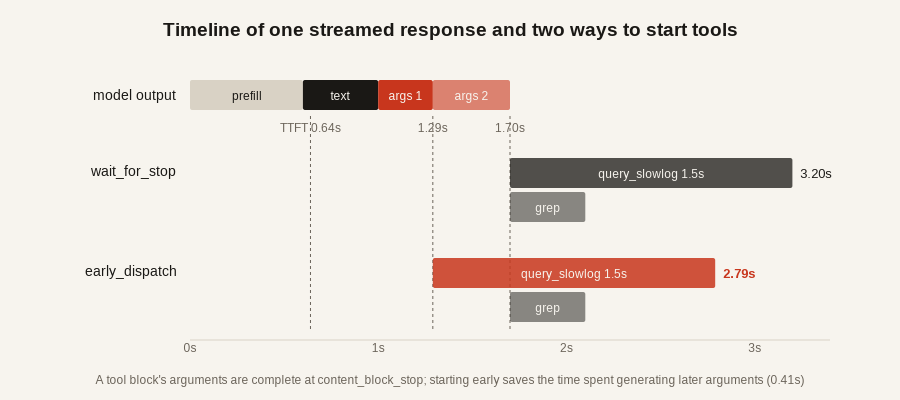
Simulating a streamed response
The code below simulates one response in the event format above: output starts after 0.6 seconds, first a 20-character sentence of explanation, then two tool-call blocks. The consumer handles it in two ways:
wait_for_stop: read the whole stream, then run all the tools;early_dispatch: each tool block's arguments are complete at itscontent_block_stop, so start that tool right away without waiting for the stream to end.
The two tools take different times: query_slowlog 1.5 seconds, grep_log 0.4 seconds. Save it as stream_events.py; Python 3.9 or later, using only the standard library's asyncio (Python's asynchronous I/O library, which advances several waiting tasks in turn on one thread):
import asyncio
import json
import time

# ---------- A fake streamed response: event types match the Anthropic Messages API SSE stream ----------

PREFILL_SECONDS = 0.6      # from request to first token (network + queue + prefill)
DECODE_TPS = 50            # tokens generated per second (assumed)

TEXT = "Check both logs now."
TOOLS = [
    ("toolu_01", "query_slowlog", {"limit": 5, "min_ms": 500}),
    ("toolu_02", "grep_log", {"pattern": "/orders", "minutes": 30}),
]

def chunks(s, size):
    """Split a string into fixed-size pieces to mimic token-by-token output."""
    return [s[i:i + size] for i in range(0, len(s), size)]

async def fake_stream():
    """Yield events (type, payload) in order. Each delta piece is about 2 tokens."""
    await asyncio.sleep(PREFILL_SECONDS)
    yield "message_start", {}
    yield "content_block_start", {"index": 0, "type": "text"}
    for piece in chunks(TEXT, 2):
        await asyncio.sleep(2 / DECODE_TPS)
        yield "content_block_delta", {"index": 0, "type": "text_delta", "text": piece}
    yield "content_block_stop", {"index": 0}
    for i, (tid, name, args) in enumerate(TOOLS, start=1):
        yield "content_block_start", {"index": i, "type": "tool_use", "id": tid, "name": name}
        # arguments arrive as pieces of a JSON string; a single piece is usually not valid JSON
        for piece in chunks(json.dumps(args), 4):
            await asyncio.sleep(2 / DECODE_TPS)
            yield "content_block_delta", {"index": i, "type": "input_json_delta",
                                          "partial_json": piece}
        yield "content_block_stop", {"index": i}
    yield "message_delta", {"stop_reason": "tool_use"}
    yield "message_stop", {}

# ---------- Tools: slow-query log 1.5 s, log search 0.4 s ----------

TOOL_SECONDS = {"query_slowlog": 1.5, "grep_log": 0.4}

async def execute(name, args):
    await asyncio.sleep(TOOL_SECONDS[name])
    return f"{name} ok"

# ---------- Two ways to consume the stream ----------

async def consume(early_dispatch):
    """Read the whole stream. With early_dispatch=True, each tool starts as soon as its
    tool_use block ends.

    Returns the time marks, in seconds since the request was sent.
    """
    t0 = time.perf_counter()
    since = lambda: time.perf_counter() - t0
    marks, buffers, blocks, tasks = {}, {}, {}, []
    bad_parses = 0
    async for kind, ev in fake_stream():
        if kind == "message_start":
            marks["first_event"] = since()
        elif kind == "content_block_start" and ev["type"] == "tool_use":
            blocks[ev["index"]] = ev
            buffers[ev["index"]] = ""
        elif kind == "content_block_delta":
            if ev["type"] == "text_delta" and "ttft" not in marks:
                marks["ttft"] = since()          # the first token that can be shown to the user
            elif ev["type"] == "input_json_delta":
                buffers[ev["index"]] += ev["partial_json"]
                try:
                    json.loads(buffers[ev["index"]])
                except json.JSONDecodeError:
                    bad_parses += 1              # parsing fails until the pieces are complete
        elif kind == "content_block_stop" and ev["index"] in blocks:
            # the block has ended, so the arguments are complete: the earliest safe moment to parse
            args = json.loads(buffers[ev["index"]])
            name = blocks[ev["index"]]["name"]
            marks.setdefault("first_tool_args", since())
            if early_dispatch:
                tasks.append(asyncio.create_task(execute(name, args)))
            else:
                tasks.append((name, args))
        elif kind == "message_stop":
            marks["stream_done"] = since()
    if not early_dispatch:
        tasks = [asyncio.create_task(execute(n, a)) for n, a in tasks]
    await asyncio.gather(*tasks)
    marks["tools_done"] = since()
    marks["bad_parses"] = bad_parses
    return marks

async def main():
    for early in (False, True):
        m = await consume(early)
        label = "early_dispatch" if early else "wait_for_stop "
        print(f"{label} first_event={m['first_event']:.2f}s ttft={m['ttft']:.2f}s "
              f"first_tool_args={m['first_tool_args']:.2f}s stream_done={m['stream_done']:.2f}s "
              f"tools_done={m['tools_done']:.2f}s bad_parses={m['bad_parses']}")

if __name__ == "__main__":
    asyncio.run(main())
Typical output (timed with asyncio.sleep, so the last digit varies by up to 10 milliseconds):
wait_for_stop  first_event=0.60s ttft=0.64s first_tool_args=1.29s stream_done=1.70s tools_done=3.20s bad_parses=15
early_dispatch first_event=0.60s ttft=0.64s first_tool_args=1.29s stream_done=1.70s tools_done=2.79s bad_parses=15
Reading the time marks
ttft = 0.64 s: 0.6 seconds of prefill plus 0.04 seconds for the first text piece. The user starts seeing text at this moment.
first_tool_args = 1.29 s: the arguments of the first tool block, query_slowlog, are complete. Before them come the 20-character sentence (10 pieces) and 27 characters of argument JSON (7 pieces), 0.04 seconds each.
stream_done = 1.70 s: the second tool block's 37 characters of arguments (10 pieces) are written and the stream ends.
tools_done: here the two approaches part. wait_for_stop starts both tools at 1.70 seconds; they run concurrently, the longer one takes 1.5 seconds, and they finish at 3.20. early_dispatch starts query_slowlog at 1.29 seconds and it finishes at 2.79; grep_log starts at 1.70 and finishes at 2.10, off the critical path. Total time drops by 0.41 seconds, exactly the time it took to generate the second tool block's arguments.
bad_parses = 15: the two tool blocks have 17 argument pieces, parsing was attempted 17 times while joining them, and the first 15 failed; only the last attempt for each block succeeded. Tool arguments are a JSON object whose closing brace is in the last piece, so every parse in the middle fails. Rather than trying to parse after every piece, use content_block_stop as the signal that the arguments are complete: it does not depend on the shape of the arguments and does not cost a parse per piece. A UI that wants to show arguments as they are generated can use a dedicated parser for incomplete JSON, but running a tool needs complete arguments.
What starting early buys, and where it stops
How much starting early saves depends on two things: how many tool calls the model issued in one response, and how slow the earlier tools are. The upper bound of the saving is "the time to generate the arguments of every later tool block". Here that is only 0.41 seconds, under 2% of a 30-second task.
It also has preconditions:
- The tools are independent. If the second tool needs the first one's result (look up slow queries, then run
EXPLAINon one of them), the model will not issue both in one response; but the runtime also has to make sure tools in the same response do not conflict over resources, such as two tools writing the same file. Article 29 handles this with a dependency graph. - The tools have no side effects, or their side effects can be undone. When a stream breaks midway (a network drop, a server error), tools already started do not stop. For read-only tools that makes no difference; for tools that send messages or change data, starting early means producing irreversible results before the model has finished its output. Article 32 covers how to keep tools with side effects from running twice.
- Permission checks come first. Operations that need human confirmation (Article 43) wait for the user whether or not the response is streamed, so starting early gains nothing.
So the sensible engineering default is: start read-only tools when their block ends; start tools with side effects only after the stream ends and stop_reason is confirmed as tool_use.
What the user is actually waiting for in an Agent
Besides the TTFT and total latency of each model call, an Agent has a third time: from submitting the task to seeing the final conclusion. In a 10-round task the user first sees round 1's TTFT, but what they actually wait for is 10 model calls plus every tool run.
Streaming does little for that third time: each round's total latency is unchanged, and the only saving is the overlap gained by starting tools early. What it mainly brings is visibility: during those 10 rounds the user can see what the model says at each step and which tools it calls, instead of a blank screen for 30 seconds. That visibility has engineering value too: a user who sees the Agent heading the wrong way can cancel early, which saves more budget than waiting for it to finish. Article 57 discusses progress reporting and cancellation for long tasks.
Measuring TTFT in a real system
The time marks in this article all come from a simulation. Against a real API, the way consume records them carries over directly: note t0 before sending the request, record TTFT when the first text_delta arrives, and record a mark at every content_block_stop and at message_stop. Anthropic's Python SDK provides a client.messages.stream(...) context manager; iterating over it yields these events.
One detail to watch: if the model starts its response with a tool call and no text block, the first text_delta may never come. In that case use the arrival of message_start or of the first content_block_delta as TTFT, and state the definition alongside the metric.
Plot each round's TTFT next to its input token count and you can see how pronounced Article 02's prefill growth is in your own system. If the curve keeps rising with the round count, the prefix cache is not working; go back to Article 04 and check how requests are assembled.
That closes the six articles of part one, the loop skeleton. The next article begins context management by separating two ideas that are often used interchangeably: what the model sees this time, and what the system keeps.