
AI Agents in Practice: From One Model Call to a Production System
Part 1
〇一What One Agent Task Is Made Of
The user sees one answer; behind it are 4 model calls, 4 tool calls and 10 messages
Give a debugging Agent one sentence: The /orders endpoint got slow in the last 30 minutes. Find out why.
A few seconds later it answers: orders.user_id has no index; the query scans ~1.2M rows. Add the index and measure again.
On screen this is one question and one answer. Record what the runtime did and the same task turns into 4 model calls and 4 tool calls; the message list grows from 2 messages to 10, and the four requests send the model 7,144 characters in total, of which the first request carries only 182.
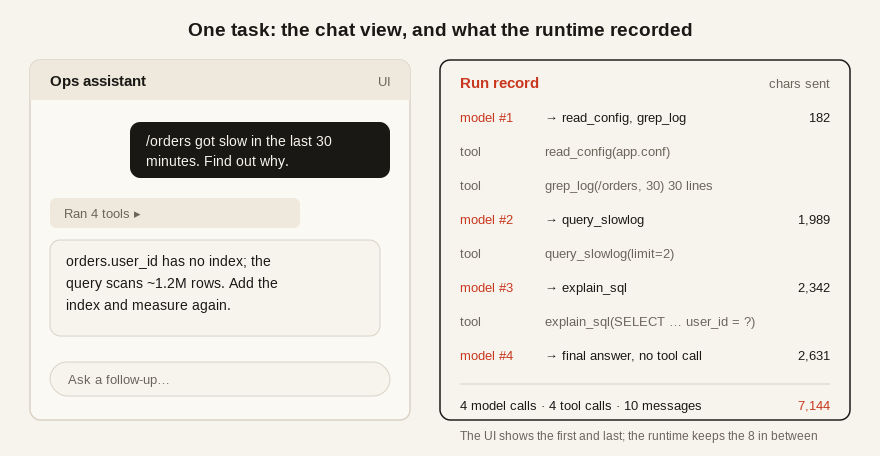
Every later discussion of Agent performance, cost and reliability comes back to these numbers, so the first step is to see where they come from.
The model only reads input and writes output
The model here is a large language model (LLM): a neural network that predicts the text that follows its input. Through an API, every request is independent: the server reads everything the request carries, generates some output, and is done. The model remembers nothing between two requests.
A request's content is organized as a message list (messages). Each message carries a role:
| Role | Written by | Content |
|---|---|---|
system | developer | behavior rules, background constraints |
user | user | the task or a follow-up |
assistant | model | the model's previous output |
tool | runtime | the result of running a tool |
Since the model has no memory, the "conversation history" has to be kept by the caller and resent with every request. In the second request the model knows what happened in the first only because the first question and answer were put back into the message list.
The unit the model actually processes is the token: a piece of text produced by the tokenizer, which might be one Chinese character, part of an English word, or a punctuation mark. According to OpenAI, English text averages about 4 characters per token. This article counts characters; the next converts them to tokens.
With the o200k_base encoding (the vocabulary OpenAI has used since GPT-4o), the same task written in two languages splits very differently: the Chinese version, 23 characters, becomes 13 tokens, about 1.8 characters per token; the English sentence above, 67 characters, becomes 17 tokens, about 3.9 characters per token. OpenAI's tokenizer page shows the split for any text you paste.
A tool call is structured text; the runtime runs it
A tool is a program outside the model: reading a file, querying a database, calling an HTTP endpoint. The model cannot run any of them.
The tool calling mechanism (also called function calling) that model APIs provide works like this: the developer declares in the request which tools exist and what parameters each accepts; if the model decides it needs one, it writes a structured request in its output containing the tool name and JSON arguments; the caller reads that request, runs the tool itself, adds the result back to the message list as a tool message, and sends the next request. The documentation from Anthropic and OpenAI describes this same flow with different field names.
The part of the program that keeps the messages, runs the tools and decides whether to continue is called the runtime. An Agent can be read as "model + runtime": the model decides what to do next, the runtime does it and hands the result back.
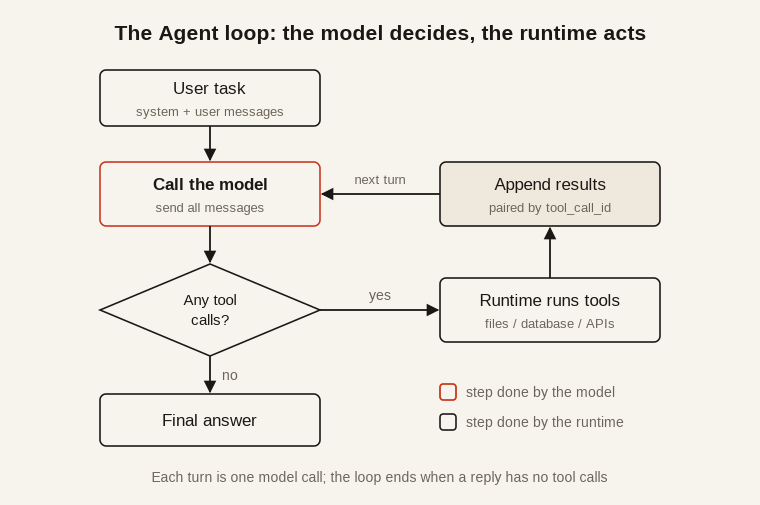
Each turn of the loop is one model call. When the model's response contains no tool call, the runtime treats the task as finished and the loop ends.
A minimal loop with a fake model
To make every step reproducible, the code below calls no real model API. A fake_model follows a fixed script instead: it checks which tool results already appear in the message list and decides the next step from that. The tools return fixed data too. This keeps the attention on the loop rather than on the model's randomness.
Save it as agent_loop.py and run it with Python 3.9 or later; no third-party packages are needed:
import json

# ---------- Tools: fixed data standing in for the systems a debugging task touches ----------

def read_config(path):
    """Read a config file. path: file path. Returns the file content as a string."""
    return "db.pool_size=10\ndb.timeout_ms=3000\ncache.enabled=false\n"

def grep_log(pattern, minutes):
    """Search the last `minutes` minutes of application logs for `pattern`. Returns matching lines."""
    lines = [
        f"2026-11-20T10:{m:02d}:13 WARN /orders took 2{m % 10}40ms"
        for m in range(minutes)
    ]
    return "\n".join(lines)

def query_slowlog(limit):
    """Return the `limit` slowest SQL statements from the database slow-query log."""
    rows = [
        {"sql": "SELECT * FROM orders WHERE user_id = ?", "avg_ms": 1870},
        {"sql": "SELECT * FROM items WHERE order_id IN (...)", "avg_ms": 210},
    ]
    return json.dumps(rows[:limit])

def explain_sql(sql):
    """Return the execution plan of a SQL statement. sql: the statement to analyze."""
    return json.dumps({"type": "ALL", "rows": 1_200_000, "key": None})

TOOLS = {
    "read_config": read_config,
    "grep_log": grep_log,
    "query_slowlog": query_slowlog,
    "explain_sql": explain_sql,
}

# ---------- Fake model: decides the next step from the tool results it has seen ----------

def fake_model(messages):
    """Simulate one model call. messages: the full message list.

    Returns an assistant message: either with tool_calls (asking the runtime
    to run tools) or with content only (meaning the task is done).
    """
    seen = {m["name"] for m in messages if m["role"] == "tool"}
    if not seen:
        # Round 1: two independent reads, requested in a single response
        return {"role": "assistant", "content": "", "tool_calls": [
            {"id": "call_1", "name": "read_config", "args": {"path": "app.conf"}},
            {"id": "call_2", "name": "grep_log",
             "args": {"pattern": "/orders", "minutes": 30}},
        ]}
    if "query_slowlog" not in seen:
        return {"role": "assistant", "content": "", "tool_calls": [
            {"id": "call_3", "name": "query_slowlog", "args": {"limit": 2}},
        ]}
    if "explain_sql" not in seen:
        return {"role": "assistant", "content": "", "tool_calls": [
            {"id": "call_4", "name": "explain_sql",
             "args": {"sql": "SELECT * FROM orders WHERE user_id = ?"}},
        ]}
    return {"role": "assistant", "content":
            "orders.user_id has no index; the query scans ~1.2M rows. Add the index and measure again."}

# ---------- Runtime: this is the Agent loop itself ----------

def run_agent(task, max_steps=10):
    """Run one Agent task. task: the user's task; max_steps: cap on model calls."""
    messages = [
        {"role": "system", "content": "You help debug production performance problems."},
        {"role": "user", "content": task},
    ]
    stats = {"model_calls": 0, "tool_calls": 0, "chars_sent": []}

    for step in range(1, max_steps + 1):
        # Every call sends the whole message list: the model keeps no history
        stats["chars_sent"].append(len(json.dumps(messages, ensure_ascii=False)))
        reply = fake_model(messages)
        stats["model_calls"] += 1
        messages.append(reply)

        calls = reply.get("tool_calls")
        if not calls:                      # no tool calls = the model considers the task done
            return reply["content"], messages, stats

        for call in calls:                 # the runtime runs them; the model never touches the systems
            result = TOOLS[call["name"]](**call["args"])
            stats["tool_calls"] += 1
            messages.append({
                "role": "tool",
                "tool_call_id": call["id"],  # pairs the result with its request
                "name": call["name"],
                "content": result,
            })
        print(f"step {step}: tools={[c['name'] for c in calls]}, "
              f"messages={len(messages)}")

    raise RuntimeError("max_steps reached before the task finished")

if __name__ == "__main__":
    answer, messages, stats = run_agent(
        "The /orders endpoint got slow in the last 30 minutes. Find out why.")
    print("answer:", answer)
    print("model_calls:", stats["model_calls"])
    print("tool_calls:", stats["tool_calls"])
    print("messages:", len(messages))
    print("chars_sent per call:", stats["chars_sent"])
    print("chars_sent total:", sum(stats["chars_sent"]))
Output (the data is fixed, so every run is identical):
step 1: tools=['read_config', 'grep_log'], messages=5
step 2: tools=['query_slowlog'], messages=7
step 3: tools=['explain_sql'], messages=9
answer: orders.user_id has no index; the query scans ~1.2M rows. Add the index and measure again.
model_calls: 4
tool_calls: 4
messages: 10
chars_sent per call: [182, 1989, 2342, 2631]
chars_sent total: 7144
The part of run_agent that is the "Agent loop" proper is under 30 lines. It does four things: send the message list to the model, append the response, run the tools the response asks for, append their results. Every other capability, including context compression, concurrency, timeouts and permissions, is logic inserted at one of those four points.
The task step by step
| Model call | What the model saw | Its decision | What the runtime did | Messages after |
|---|---|---|---|---|
| 1st | system, user | request read_config and grep_log together | ran both tools, appended 1 assistant and 2 tool messages | 5 |
| 2nd | the 5 above | request query_slowlog | appended 1 assistant, 1 tool | 7 |
| 3rd | the 7 above | request explain_sql | appended 1 assistant, 1 tool | 9 |
| 4th | the 9 above | no more tools; give the conclusion | appended the final answer, ended the loop | 10 |
Two points deserve a closer look.
First, the number of model calls differs from the number of tool calls. In the first response the model asked for two independent tools at once. Current mainstream APIs allow one response to contain several tool calls (Anthropic's documentation calls this parallel tool use). Had the model split them across two responses, there would have been 5 model calls, a whole extra round. How many tool calls fit in one response decides how many times the loop turns.
Second, every tool message carries a tool_call_id that matches an id in the assistant message. That id is how the model, in the next request, tells which result belongs to which request. Real APIs validate this pairing strictly: if an assistant message issued a tool call and the matching result is missing, the request is rejected outright. This constraint comes back repeatedly once we start trimming history.
Why the second request suddenly grows
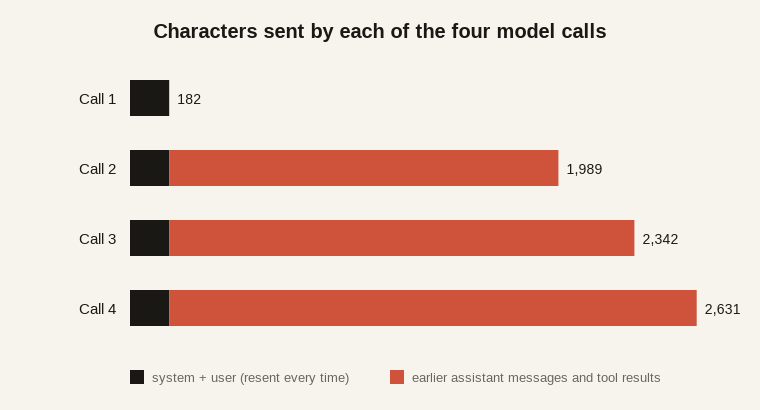
The first request is 182 characters: one system message and one user message. The second is 1,989. Of the extra 1,807 characters, 1,455 come from the 30 log lines grep_log returned; the rest are the read_config result (138) and the model's tool-call request (208).
That number shows two things.
One: how large a request is depends mainly on how much earlier tools returned, not on how much the user said. In this task the user typed one sentence, and tool results make up about 74% of the fourth request.
Two: once a tool result enters the message list, every later request carries it again. The 30 log lines were sent in the second, third and fourth requests. The four requests sent 7,144 characters in total, while the final message list itself is only 2,758: on average the same content was sent 2.6 times.
With 4 rounds this repetition is cheap. At 50 rounds it grows with the square of the number of rounds, which is what the next article computes.
When the loop stops
The loop above has two exits: the model's response has no tool call, or the number of model calls reaches max_steps.
The model controls the first. It may stop too early, or keep deciding that it "needs to check one more thing". The runtime controls the second, which does not care whether the task is done; it only keeps the loop from running forever.
An Agent with only the first exit, once the model falls into re-reading the same file, keeps spending calls until an external timeout or a billing alert stops it. An Agent with only the second exit is meaningless. In practice both are needed, plus a token budget and a cap on wall-clock time (the time that has actually passed since the start) where needed. Article 05 covers how to combine stop conditions.
How this loop relates to ReAct
ReAct (Reasoning + Acting, Yao et al., 2022) is the source most often cited for this structure: the model alternates between reasoning text and actions, and the observed result of each action becomes input to the next step. When the paper came out there was no native tool-calling API; actions were written in a fixed text format and parsed by a program. Today's tool-calling APIs moved that parsing to the server; the loop is unchanged.
In Building effective agents, Anthropic separates such systems into two kinds: workflows, whose steps are fixed in code ahead of time, and agents, where the model decides the next step dynamically inside a loop. run_agent above is the latter. Even though fake_model follows a fixed script, the runtime assumes no order of steps, and with a real model it could take a different path.
Three numbers to record from day one
One Agent task yields at least three counts:
- model calls: how many times the loop turned;
- tool calls: how many operations the runtime performed on external systems;
- data sent per request: in characters or tokens.
None of the three is visible from the final answer. Every later analysis of "why the Agent got slower", "why the bill came in over budget" or "why it keeps reading the same file" starts from these three numbers.
The code above keeps one simplification on purpose: it counts quantities but not time. How long the model calls took, how long the tools took, how long was spent waiting, and how each changes as rounds accumulate, is the subject of the next article.